Um eMails mit Hilfe von PHPMailer über Office365 versenden zu können, sind einige Einstellungen vorzunehmen und es ist einiges zu beachten.
AZURE ACTIVE DIRECTORY
The following steps register a new app in Azure Active Directory:

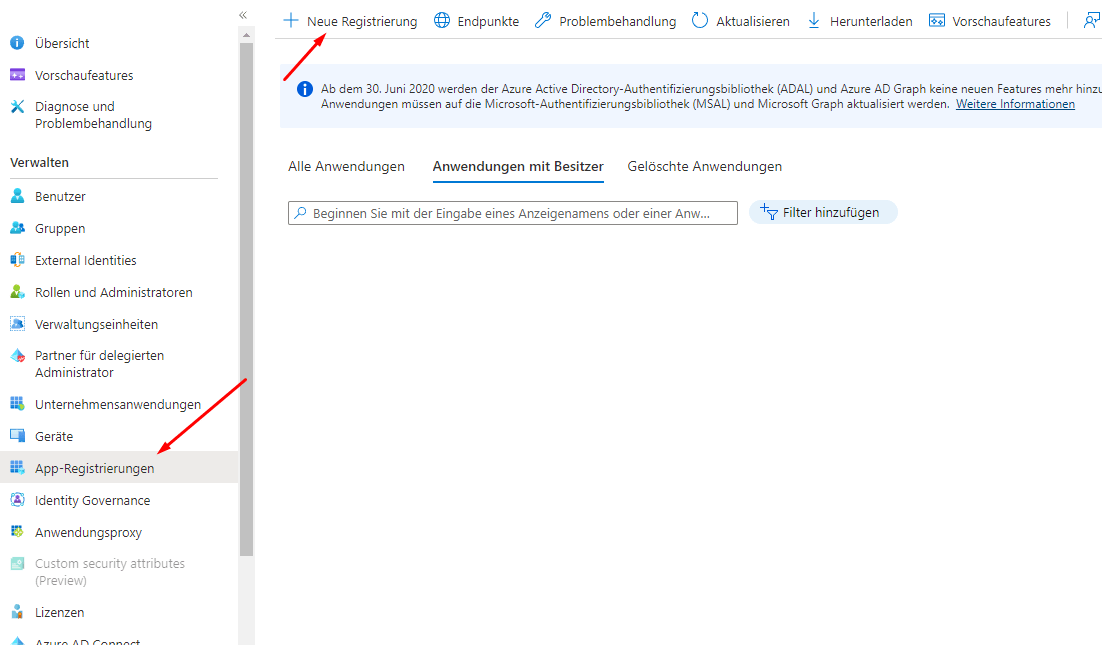
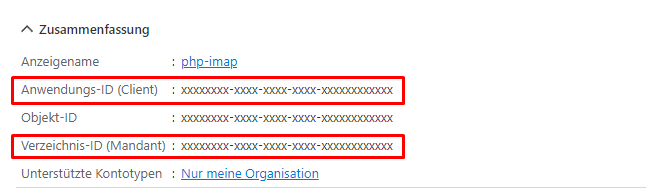
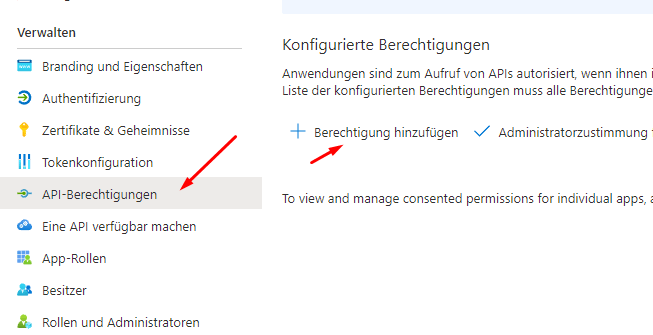
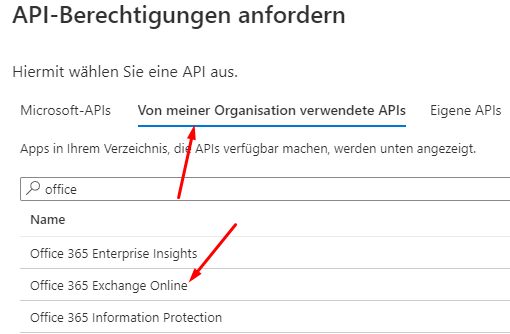

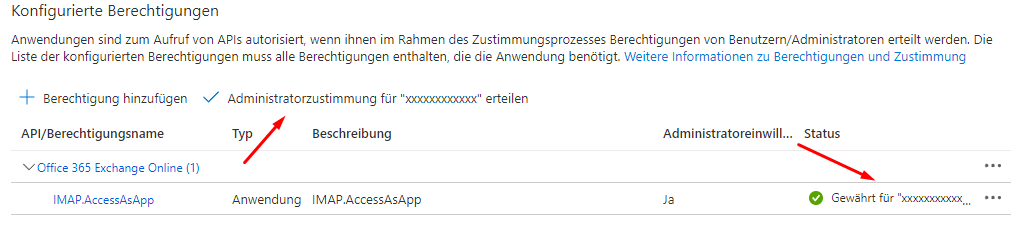

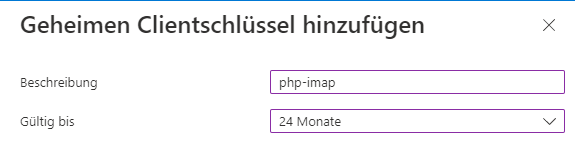
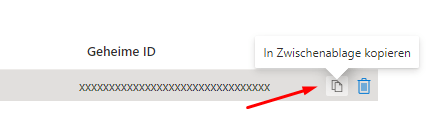
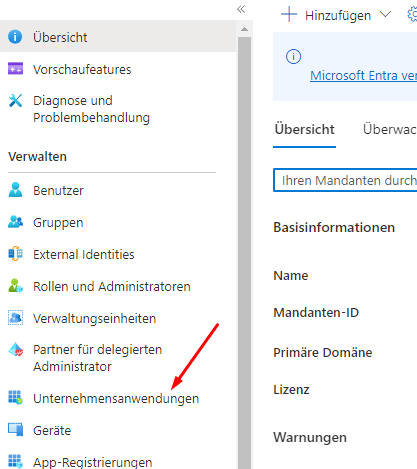
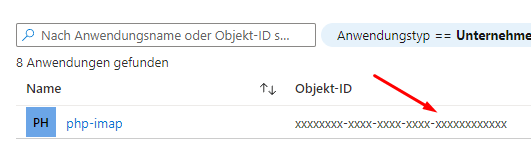
Was in dieser Anleitung fehlt, ist die Redirect URI. Diese muss zwingend eingetragen werden, sonst erfolgt eine entsprechende Fehlermeldung. Wo diese eingetragen muss, weiß ich nicht. Aber hier die Stelle:
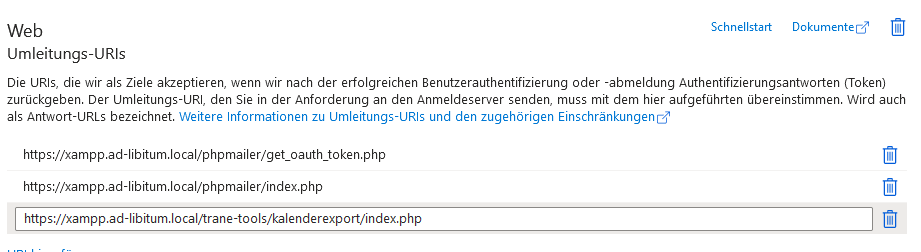
Bei der Redirect-URI ist übrigens unerheblich, ob diese öffentlich erreichbar ist oder nicht. Sie muss lediglich auf dem lokalen System erreichbar sein. Und es können mehrere URIs eingetragen werden. Auf Systemen ohne SSL die URI trotzdem mit https eintragen und auch so aufrufen.
Installation
composer require phpmailer/phpmailer
composer require thenetworg/oauth2-azure
composer require greew/oauth2-azure-provider --with-all-dependencies
composer require stevenmaguire/oauth2-microsoft
Erster Test
Als erster Funktionstest sollte das Skript get_oauth_token.php ausgeführt werden. Nur wenn alles richtig eingestellt ist, wird man einen sogenannten Refresh Token zurück bekommen. Und als Provider muss Azure gewählt werden! Dieser wird für die weitere Arbeit zwingend benötigt.
PHP-Code
<?php
//Import PHPMailer classes into the global namespace
use PHPMailer\PHPMailer\PHPMailer;
use PHPMailer\PHPMailer\SMTP;
use PHPMailer\PHPMailer\OAuth;
//Alias the League Google OAuth2 provider class
use Greew\OAuth2\Client\Provider\Azure;
//SMTP needs accurate times, and the PHP time zone MUST be set
//This should be done in your php.ini, but this is how to do it if you don't have access to that
date_default_timezone_set('Etc/UTC');
//Load dependencies from composer
//If this causes an error, run 'composer install'
require 'vendor/autoload.php';
require_once "config.php";
//Create a new PHPMailer instance
$mail = new PHPMailer();
//Tell PHPMailer to use SMTP
$mail->isSMTP();
//Enable SMTP debugging
//SMTP::DEBUG_OFF = off (for production use)
//SMTP::DEBUG_CLIENT = client messages
//SMTP::DEBUG_SERVER = client and server messages
// TODO: turn off for production
$mail->SMTPDebug = SMTP::DEBUG_SERVER;
//Set the hostname of the mail server
$mail->Host = SMTP_SERVER;
//Set the SMTP port number:
// - 465 for SMTP with implicit TLS, a.k.a. RFC8314 SMTPS or
// - 587 for SMTP+STARTTLS
$mail->Port = SMTP_PORT;
//Set the encryption mechanism to use:
// - SMTPS (implicit TLS on port 465) or
// - STARTTLS (explicit TLS on port 587)
$mail->SMTPSecure = PHPMailer::ENCRYPTION_STARTTLS;
//Whether to use SMTP authentication
$mail->SMTPAuth = true;
//Set AuthType to use XOAUTH2
$mail->AuthType = 'XOAUTH2';
//Start Option 1: Use league/oauth2-client as OAuth2 token provider
//Fill in authentication details here
//Either the microsoft account owner, or the user that gave consent
$email = SMTP_USER;
$clientId = CLIENT_ID;
$clientSecret = CLIENT_SECRET;
$tenantId = TENANT_ID;
//Obtained by configuring and running get_oauth_token.php
//after setting up an app in Google Developer Console.
$refreshToken = REFRESH_TOKEN;
//Create a new OAuth2 provider instance
$provider = new Azure(
[
'clientId' => $clientId,
'clientSecret' => $clientSecret,
'tenantId' => $tenantId,
]
);
//Pass the OAuth provider instance to PHPMailer
$mail->setOAuth(
new OAuth(
[
'provider' => $provider,
'clientId' => $clientId,
'clientSecret' => $clientSecret,
'refreshToken' => $refreshToken,
'userName' => $email,
]
)
);
//End Option 1
//Option 2: Another OAuth library as OAuth2 token provider
//Set up the other oauth library as per its documentation
//Then create the wrapper class that implementations OAuthTokenProvider
//$oauthTokenProvider = new MyOAuthTokenProvider(/* Email, ClientId, ClientSecret, etc. */);
//Pass the implementation of OAuthTokenProvider to PHPMailer
//$mail->setOAuth($oauthTokenProvider);
//End Option 2
//Set who the message is to be sent from
//For Outlook, this generally needs to be the same as the user you logged in as
$mail->setFrom($email, 'EasyTec');
//Set who the message is to be sent to
$mail->addAddress('oliver@slackertreff.de', 'Oliver Wagner');
//Set the subject line
$mail->Subject = 'PHPMailer Outlook XOAUTH2 SMTP test';
//Read an HTML message body from an external file, convert referenced images to embedded,
//convert HTML into a basic plain-text alternative body
$mail->CharSet = PHPMailer::CHARSET_UTF8;
$mail->msgHTML("Geht es am nächsten Tag auch noch?");
//Replace the plain text body with one created manually
$mail->AltBody = 'This is a plain-text message body';
//Attach an image file
//$mail->addAttachment('images/phpmailer_mini.png');
//send the message, check for errors
if (!$mail->send()) {
echo 'Mailer Error: ' . $mail->ErrorInfo;
} else {
echo 'Message sent!';
}
Funktionierender Code findet sich in der Trane Kalendersynchronisation und auf XAMPP in PHPMailer.
Linksammlung
https://stackoverflow.com/questions/73868867/how-to-implement-oauth-2-0-in-phpmailer-for-exchange-online
alt ohne OAUTH: https://stackoverflow.com/questions/24947434/setting-up-phpmailer-with-office365-smtp – da kommt weiter unten eine Anleitung für die Einstellungen auf MS-Seite
https://onelinerhub.com/phpmailer/how-do-i-use-phpmailer-with-oauth—-
https://stackoverflow.com/questions/61895470/smtp-to-o365-using-oauth2-and-phpmailer
https://vielhuber.de/en/blog/access-with-php-to-exchange-office-365/ – Anleitung für Einstellungen auf MS-Seite
https://github.com/PHPMailer/PHPMailer/discussions/2747 – wegen Steven Maguire
Refresh Token: https://www.devbabu.com/how-to-use-phpmailer-with-xoauth2/ Punkte 17 und 18
Redirect URL: a URL the browser will be redirected to, once the user has granted permission
Note firstly that Steve Maguire’s ‘provider’ Stevenmaguire\OAuth2\Client\Provider\Microsoft was apparently written for Windows Live Mail (see for example the WLM scopes in get_oauth_token.php) and has had little maintenance since then. Jan Hajek’s thenetworg/oauth2-azure is still under active development and works well with PHPMailer. We use it on all our websites. (https://github.com/PHPMailer/PHPMailer/discussions/2747)